Pleasing Android Layouts
satya - Sunday, September 13, 2009 1:07:23 PM
pleasing android layout xml samples
pleasing android layout xml samples
satya - Sunday, September 13, 2009 1:09:24 PM
android sample layouts
android sample layouts
satya - Sunday, September 13, 2009 1:11:12 PM
start at the begining, introduction to layouts
satya - Sunday, September 13, 2009 1:22:47 PM
xml tags for any basic view
satya - Sunday, September 13, 2009 1:23:13 PM
android border setting view
android border setting view
satya - Monday, September 14, 2009 10:24:27 AM
You can set a shape as the background of a layout. ex shape
<shape xmlns:android="http://schemas.android.com/apk/res/android">
    <stroke android:width="4dp" android:color="#FF00FF00" />
    <padding android:left="7dp" android:top="7dp"
            android:right="7dp" android:bottom="7dp" />
    <corners android:radius="4dp" />
</shape>
satya - Monday, September 14, 2009 10:30:09 AM
Here are some samples from the Android API samples
Here are some samples from the Android API samples
satya - Monday, September 14, 2009 10:30:31 AM
shape 1
<shape xmlns:android="http://schemas.android.com/apk/res/android">
    <solid android:color="#00000000"/>
    <stroke android:width="2dp" android:color="#ff000000"/>
    <padding android:left="1dp" android:top="1dp"
            android:right="1dp" android:bottom="1dp" />
</shape>
satya - Monday, September 14, 2009 10:32:01 AM
shape_2.xml
<shape xmlns:android="http://schemas.android.com/apk/res/android">
    <solid android:color="#FF0000FF"/>
    <stroke android:width="4dp" android:color="#FFFFFFFF"
            android:dashWidth="1dp" android:dashGap="2dp" />
    <padding android:left="7dp" android:top="7dp"
            android:right="7dp" android:bottom="7dp" />
    <corners android:radius="4dp" />
</shape>
satya - Monday, September 14, 2009 10:32:37 AM
shape_3.xml
<shape xmlns:android="http://schemas.android.com/apk/res/android" android:shape="oval">
    <solid android:color="#00000000"/>
    <stroke android:width="4dp" android:color="#99000000"
            android:dashWidth="4dp" android:dashGap="2dp" />
    <padding android:left="7dp" android:top="7dp"
            android:right="7dp" android:bottom="7dp" />
    <corners android:radius="4dp" />
</shape>
satya - Monday, September 14, 2009 10:33:02 AM
shape_4.xml
<shape xmlns:android="http://schemas.android.com/apk/res/android" android:shape="line">
    <stroke android:width="1dp" android:color="#FF000000"
            android:dashWidth="1dp" android:dashGap="2dp" />
</shape>
satya - Monday, September 14, 2009 10:33:29 AM
shape_5.xml
<shape xmlns:android="http://schemas.android.com/apk/res/android" android:shape="rectangle">
    <gradient android:startColor="#FFFF0000" android:endColor="#80FF00FF"
            android:angle="270"/>
    <padding android:left="7dp" android:top="7dp"
            android:right="7dp" android:bottom="7dp" />
    <corners android:radius="8dp" />
</shape>
satya - Friday, September 18, 2009 5:28:07 PM
Here are possible options for a textview
satya - Friday, September 18, 2009 5:28:36 PM
Here is aligning a text view
satya - Friday, September 18, 2009 5:30:45 PM
possible values for android:gravity
top
bottom
left
right
center_vertical
center_horizontal
fill_horizontal
center
fill
clip_vertical
clip_horizontal
satya - Friday, September 18, 2009 5:34:47 PM
A discussion on text size, sp, dp etc
satya - Monday, September 21, 2009 6:17:20 PM
android layout view percentage width
android layout view percentage width
satya - Monday, September 21, 2009 6:17:43 PM
See this discussion where it uses the layout_weight
satya - Monday, September 21, 2009 6:19:10 PM
Reference to View based XML defs
satya - Monday, September 21, 2009 6:21:04 PM
android layout_weight
android layout_weight
satya - Monday, September 21, 2009 6:22:18 PM
Here are some visual examples
satya - Monday, September 21, 2009 6:46:00 PM
Here is an example
<?xml version="1.0" encoding="utf-8"?>
<LinearLayout xmlns:android="http://schemas.android.com/apk/res/android"
	android:id="@+id/root_layout_id"
    android:orientation="vertical"
    android:layout_width="fill_parent"
    android:layout_height="fill_parent"
    android:background="@drawable/shape1"
    >
<TextView
	android:id="@+id/text1"
    android:layout_width="fill_parent"
    android:layout_height="wrap_content"
    android:text="Test view"
    />
<LinearLayout xmlns:android="http://schemas.android.com/apk/res/android"
	android:id="@+id/root_layout_id"
    android:orientation="horizontal"
    android:layout_width="fill_parent"
    android:layout_height="fill_parent"
    >
<TextView
    android:layout_width="wrap_content"
    android:layout_height="wrap_content"
    android:layout_weight="30"
    android:text="Test view L"
    android:background="#FFCC66"
    />
<TextView
    android:layout_width="wrap_content"
    android:layout_height="wrap_content"
    android:layout_weight="70"
    android:text="Test view R"
    android:background="#000099"
    />
</LinearLayout>
</LinearLayout>
satya - Tuesday, September 22, 2009 9:34:50 AM
linearlayout layout_height options
satya - Tuesday, September 22, 2009 10:00:22 AM
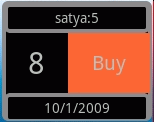
This is a pretty decent layout
<?xml version="1.0" encoding="utf-8"?>
<LinearLayout xmlns:android="http://schemas.android.com/apk/res/android"
    android:orientation="vertical"
    android:layout_width="150dp"
    android:layout_height="120dp"
    android:background="@drawable/box1"
    >
<TextView
	android:id="@+id/bdw_w_name"
    android:layout_width="fill_parent"
    android:layout_height="30dp"
    android:text="Anonymous"
    android:background="@drawable/box1"
    android:gravity="center"
    />
<LinearLayout xmlns:android="http://schemas.android.com/apk/res/android"
    android:orientation="horizontal"
    android:layout_width="fill_parent"
    android:layout_height="60dp"
    >
	<TextView
		android:id="@+id/bdw_w_days"
	    android:layout_width="wrap_content"
	    android:layout_height="fill_parent"
	    android:text="0"
	    android:gravity="center"
	    android:textSize="30sp"
	    android:layout_weight="50"
	    />
	<TextView
	   android:id="@+id/bdw_w_button_buy"
	    android:layout_width="wrap_content"
	    android:layout_height="fill_parent"
	    android:textSize="20sp"
	    android:text="Buy"
	    android:layout_weight="50"
	    android:background="#FF6633"
	    android:gravity="center"
	/>
</LinearLayout>
<TextView
	android:id="@+id/bdw_w_date"
    android:layout_width="fill_parent"
    android:layout_height="30dp"
    android:text="1/1/2000"
    android:background="@drawable/box1"
    android:gravity="center"
    />
</LinearLayout>
satya - Tuesday, September 22, 2009 2:51:59 PM
Here is how the above layout looks like
satya - Tuesday, September 22, 2009 2:52:55 PM
The box1 file is as follows
<shape xmlns:android="http://schemas.android.com/apk/res/android">
    <stroke android:width="4dp" android:color="#888888" />
    <padding android:left="2dp" android:top="2dp"
            android:right="2dp" android:bottom="2dp" />
    <corners android:radius="4dp" />
</shape>
satya - Monday, January 31, 2011 6:44:40 PM
You can use the base color from Android
<TextView android:id="@+id/textViewId"
    android:layout_width="fill_parent"
    android:layout_height="fill_parent"

    android:background="@android:color/white"

    android:text="@string/hello"
    />
But again you have only limited colors. You can check them out by doing
android.R.color.
Then eclipse will prompt what is out there. the set is very small. This could be useful to quickly try somethign. Otherwise you will need your own color set
satya - Monday, January 31, 2011 6:53:26 PM
Here is a way to control the text size
<TextView android:id="@+id/textViewId"
....
    android:textSize="@dimen/medium_size"
...
    />
satya - Monday, January 31, 2011 6:53:59 PM
Defining the dimension above
<resources>
    <string name="hello">Hello World</string>
    <dimen name="forty_pixels">40px</dimen>
    <dimen name="medium_size">100sp</dimen>
</resources>
satya - Thursday, February 03, 2011 11:03:27 AM
Not sure how legitimate this is: http://www.androidicons.com/
Not sure how legitimate this is: http://www.androidicons.com/
Just a reference. I have not verified this site for authenticity. Use it as you see fit.
satya - Friday, February 11, 2011 12:57:52 PM
Note on layoutparams
The dimension can be one of
?FILL_PARENT (renamed MATCH_PARENT in API Level 8 and higher), which means that the view wants to be as big as its parent (minus padding)
?WRAP_CONTENT, which means that the view wants to be just big enough to enclose its content (plus padding)
?an exact number
satya - Friday, February 11, 2011 1:04:51 PM
layout weight and gravity are properties of LinearLayout
gravity indicates alignment
weight Indicates how much of the extra space in the LinearLayout will be allocated to the view associated with these LayoutParams.
satya - Friday, February 11, 2011 1:05:46 PM
More on layout_weight
Indicates how much of the extra space in the LinearLayout will be allocated to the view associated with these LayoutParams. Specify 0 if the view should not be stretched. Otherwise the extra pixels will be pro-rated among all views whose weight is greater than 0.
satya - Saturday, March 05, 2011 10:42:23 AM
A vertical sandwich layout
header (fixed height)
  height:10
  weight:0

Body (Elastic)
  height:match_parent
  weight:1

footer (Fixed height)
  height:10
  weight:0
satya - Monday, November 07, 2011 10:53:31 AM
a resource file for you
<resources>
    <color name="black">#000000</color>
    <color name="red">#FF0000</color>
    <color name="white">#FFFFFF</color>
    <color name="gray">#C0C0C0</color>
    <color name="yellow">#FFFF00</color>
    <color name="blue">#0000FF</color>
    <color name="green">#00FF00</color>
</resources>